How to Type the Not Equal Sign (≠) on Mac, Windows, and Mobile

TL;DR
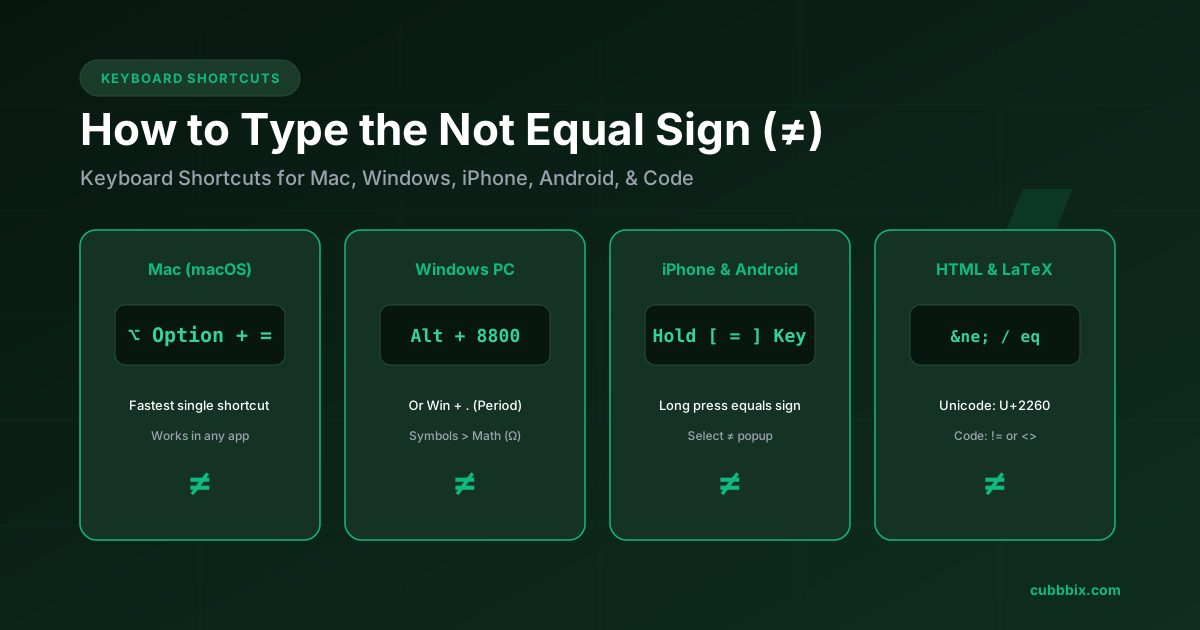
Complete guide and keyboard shortcuts to type the mathematical not equal sign (≠) on Mac, Windows, iPhone, Android, Google Docs, LaTeX, and programming languages.
Table of Contents
Quick Keyboard Shortcuts for Not Equal Sign (≠)
The not equal sign (≠) indicates that two mathematical values, expressions, or data structures are unequal. Because standard physical computer keyboards omit a dedicated key for inequality, users type this symbol through operating system shortcuts, Unicode hex codes, or programming syntax.
On a Mac, pressing Option + = types the not equal sign instantly in any program. On Windows, typing Alt + 8800 on the numeric keypad or pressing Win + . (Period) opens the native symbol selector.
How to type the not equal sign on every device
Every operating system provides direct shortcuts to insert the mathematical inequality symbol without copying and pasting from search engines.
| Platform / Software | Keyboard Shortcut / Method | Output | Notes |
|---|---|---|---|
| macOS (Mac, MacBook) | Option + = | ≠ | Hold Option (⌥) and tap the equals key. |
| Windows (Alt Code) | Alt + 8800 | ≠ | Hold Alt while typing 8800 on the 10-key numeric keypad. |
| Windows (Emoji Picker) | Win + . (Period) | ≠ | Click Symbols (Ω) > Math Symbols > select ≠. |
| Microsoft Word | 2260 then Alt + X | ≠ | Type hex code 2260 and press Alt + X to convert. |
| Google Docs / Word Equation | \ne or \neq + Space | ≠ | In Equation Mode (Insert > Equation). |
| Chromebook (ChromeOS) | Ctrl + Shift + U, 2260, Enter | ≠ | Enters Unicode input mode on ChromeOS. |
| iPhone / iPad (iOS) | Long-press [ = ] | ≠ | On numeric keyboard (123), tap and hold '=' to select ≠. |
| Android (Gboard / Samsung) | Long-press [ = ] or ?123 > =\< | ≠ | Available on the secondary mathematical symbol page. |
The origins of equality: who invented the equals sign?
Before 1557, mathematicians wrote out verbal phrases like aequales, esgale, or is equal unto in full sentences whenever they balanced an equation.
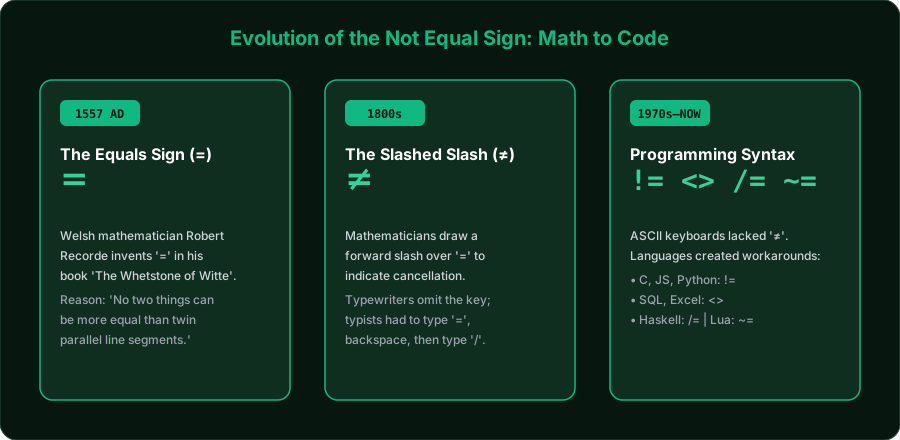
Welsh physician and mathematician Robert Recorde grew exhausted by repeatedly writing the Latin phrase aequales. In his 1557 algebra treatise The Whetstone of Witte, Recorde introduced two parallel horizontal lines to represent equality:
Recorde's original lines were over five times longer than modern typographical equals signs. Over the next two centuries, printers standardized the lines into the compact '=' used today.
The mechanical typewriter problem
During the 19th and 20th centuries, mechanical typewriters contained a strict limit of 44 to 48 physical typebars to prevent mechanical jams. Typewriter manufacturers omitted mathematical symbols like '≠', '≤', and '≥' to conserve space for the Latin alphabet and punctuation.
Typists produced the not equal symbol through manual physical overstriking: they typed the equals sign (=), pressed the backspace key to return the carriage one space, and typed a forward slash (/) directly over the center.
Why programming languages use != and <>
When computer engineers standardized the 7-bit ASCII character set (American Standard Code for Information Interchange) in 1963, they limited the standard to 128 characters (0 to 127). Mathematical symbols like '≠' were left out of standard teletype terminals.
Computer scientists created multi-character ASCII substitutions to evaluate inequality logic in software compilers:
| Operator Syntax | Programming Languages | Origin / Meaning |
|---|---|---|
| != | C, C++, Java, JavaScript, Python, Rust, Go, PHP, C# | Exclamation mark (!) denotes Boolean NOT in C syntax; != translates to NOT EQUAL. |
| <> | SQL (PostgreSQL, MySQL, Oracle), Excel, VBA, Pascal, BASIC | Represents LESS THAN OR GREATER THAN; if a number is neither, it cannot be equal. |
| !== | JavaScript, TypeScript, PHP | Strict inequality; compares both numerical value and data type without type coercion. |
| /= | Haskell, Ada, VHDL | Direct ASCII representation of a slashed equals bar (/). |
| ~= | Lua, MATLAB | Tilde (~) represents logical negation in Lua syntax. |
| -ne / .NE. | Bash Shell, PowerShell, FORTRAN | Two-letter abbreviation for Not Equal in CLI test commands and FORTRAN 77. |
Web, HTML entities, and LaTeX syntax
When compiling scientific research papers, digital documents, or web pages, use standard Unicode entities:
- HTML Named Entity:
≠(Renders as ≠) - HTML Decimal Code:
≠ - HTML Hex Code:
≠ - Unicode Code Point:
U+2260(Mathematical Operators block) - LaTeX Math Mode:
\neqor\ne(Within math environmenta \neq b)
Frequently Asked Questions
What is the quickest shortcut to type ≠ on a Mac?
Press Option + = simultaneously. On macOS, this key combination produces the mathematical not equal sign across all applications without opening menus.
How do you type the not equal sign on a Windows keyboard without a numeric keypad?
Press the Windows Key + . (Period) to open the Windows Emoji and Symbol panel. Click the Symbols (Ω) icon at the top, select the Math Symbols tab, and click the ≠ sign. In Microsoft Word, type 2260 and press Alt + X.
What is the difference between != and !== in programming?
In languages like JavaScript and PHP, != checks for loose inequality with automatic type conversion (for example, 5 != "5" evaluates to false). The strict inequality operator !== checks both value and data type without coercion (so 5 !== "5" evaluates to true).
How do you write not equal in Excel formulas?
In Microsoft Excel and Google Sheets formulas, use the bracket operator <>. For example, the formula =IF(A1<>B1, "Mismatch", "Match") checks if cell A1 is not equal to cell B1.


Was this article helpful?
Comments
Loading comments...