What Is VPN Encryption and How Does a VPN Differ from a Proxy?

TL;DR
A technical breakdown of symmetric ciphers, key exchanges, handshake protocols, and the packet-level differences between system-wide Layer 3 VPNs and application-level proxies.
Table of Contents
Quick Technical Summary
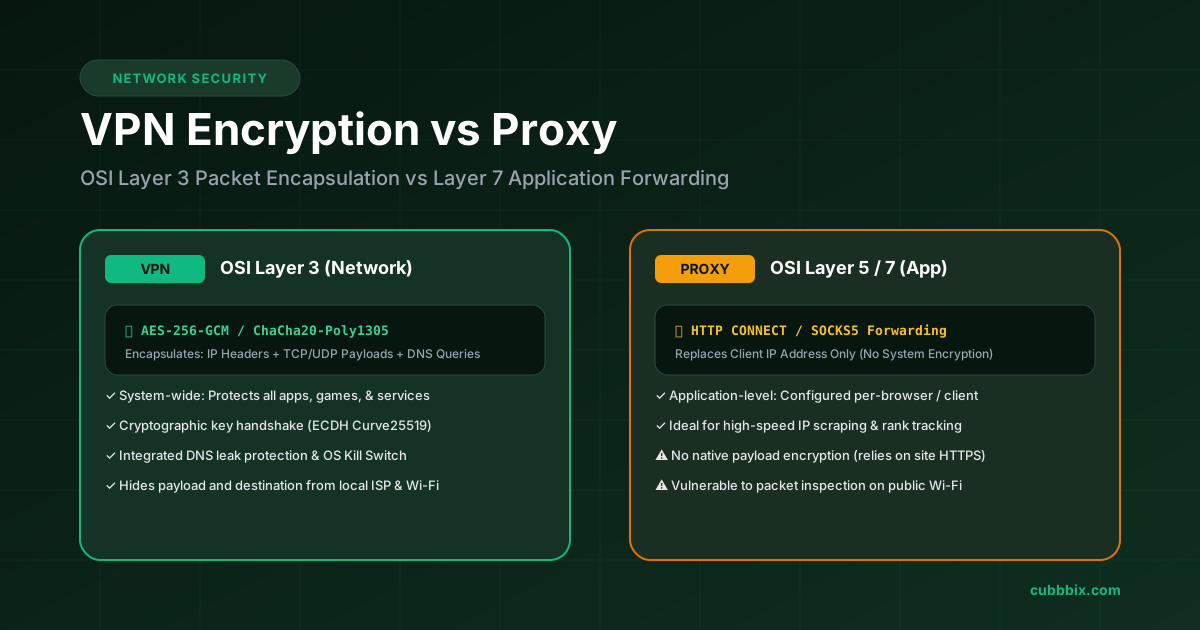
A VPN (Virtual Private Network) operates at OSI Layer 3 (Network Layer), encrypting all operating system packets with symmetric ciphers (AES-256-GCM or ChaCha20-Poly1305) and rerouting all device traffic through an authenticated tunnel. A Proxy operates at OSI Layer 5 or 7 (Application Layer), forwarding traffic from an individual client or browser without encrypting device-wide background connections.
VPN encryption converts readable network packets into ciphertext before the data leaves your device. An encrypted Virtual Private Network captures all network calls from your operating system, routes them through an authenticated intermediary server, and hides your real IP address, DNS lookups, and packet payloads from local network observers and Internet Service Providers (ISPs).
A proxy reroutes traffic from a single application to an intermediary server without adding native encryption to your operating system connections. Knowing where these technologies operate in the network stack determines whether your connection requires complete cryptographic encapsulation or lightweight IP rotation.
How VPN encryption works
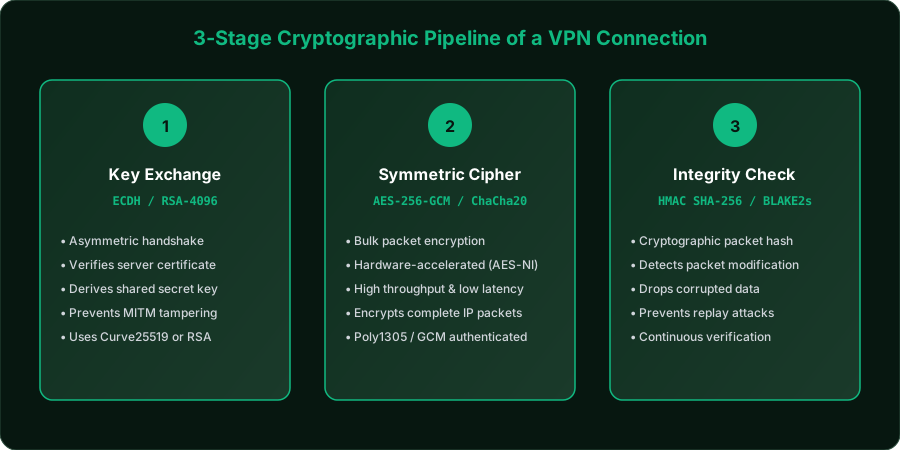
When a VPN client connects to a server, both machines perform a cryptographic handshake. This workflow executes in three sequential stages:
1. Handshake and asymmetric key exchange
The client authenticates the server using public-key cryptography. Modern protocols use Elliptic Curve Diffie-Hellman (ECDH over Curve25519) or RSA-4096 to generate and exchange session keys across public networks without exposing the private keys.
2. Symmetric session data encryption
After completing the handshake, both endpoints share a temporary session key. They use this key to encrypt and decrypt all subsequent network packets using high-speed symmetric ciphers:
- AES-256-GCM (Advanced Encryption Standard): Uses a 256-bit key in Galois/Counter Mode to encrypt and authenticate data simultaneously. Modern processors use dedicated AES-NI hardware instruction sets to compute this cipher with minimal CPU overhead.
- ChaCha20-Poly1305: A modern stream cipher paired with the Poly1305 authenticator. ChaCha20 achieves faster computation speeds than AES on mobile phones and embedded hardware without hardware-accelerated AES chips.
3. Cryptographic integrity authentication
Every data packet receives an authenticated checksum hash (such as HMAC-SHA-256 or BLAKE2s). If a packet experiences bit corruption or third-party modification in transit, the receiving endpoint fails the hash check and drops the packet immediately.
VPN protocols compared
The VPN protocol controls how client software negotiates keys, manages tunnel handshakes, and transports packets across networks.
| Protocol | Encryption Cipher | Transport Layer | Code Footprint | Primary Strength |
|---|---|---|---|---|
| WireGuard | ChaCha20-Poly1305 | UDP | ~4,000 lines | Minimal battery drain, instant connection |
| OpenVPN | AES-256-GCM / ChaCha20 | TCP (443) / UDP (1194) | ~70,000 lines | TCP port 443 mimics standard HTTPS traffic |
| IKEv2 / IPsec | AES-256-CBC / GCM | UDP (500, 4500) | Native OS module | Auto-reconnects when moving between Wi-Fi and 5G |
What is a proxy?
A proxy server is an intermediate network hop that relays traffic between a client application and a destination web server. When configured inside a specific application, that program forwards requests to the proxy IP address rather than directly connecting to the destination.
The proxy server replaces your source IP address with its own and returns the destination server response back to you. Common proxy types include:
- HTTP / HTTPS Proxies: Designed for web browser traffic. An HTTP proxy interprets web requests. When handling HTTPS sites, the proxy creates an SSL tunnel using the HTTP CONNECT command, forwarding the site encrypted data without adding proxy-level encryption.
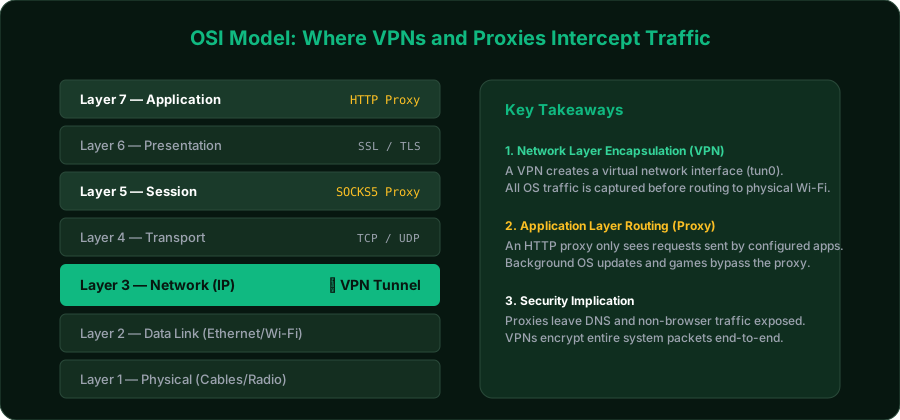
- SOCKS5 Proxies: Operates at OSI Layer 5 (Session Layer). SOCKS5 forwards any TCP or UDP network stream, including torrents, video calls, and game clients, without parsing application headers. SOCKS5 does not encrypt payload data.
- Inline / Gateway Proxies: Configured automatically by network routers (such as hotel authentication gateways or corporate firewalls) to inspect, filter, or cache employee traffic.
Technical differences: VPN vs proxy
The core distinction between a VPN and a proxy centers on OSI model operational layers, device coverage scope, and cryptographic encapsulation.
| Comparison Factor | Virtual Private Network (VPN) | Proxy (HTTP / SOCKS5) |
|---|---|---|
| OSI Layer | Layer 3 (Network Layer) | Layer 5 (SOCKS5) or Layer 7 (HTTP) |
| Coverage Scope | Operating system wide (all apps, background tasks, games) | Single application configured with proxy host & port |
| Packet Encryption | Full payload & header encryption (AES-256 / ChaCha20) | No encryption added (relies on site HTTPS) |
| DNS Leak Protection | Captures and routes all DNS queries through private resolvers | Frequently leaks system DNS queries to your default ISP |
| Kill Switch Capability | Blocks network adapter traffic if the tunnel disconnects | No system-level kill switch support |
| Latency & Throughput | Small cryptographic computation overhead | Lower latency due to raw unencrypted packet forwarding |
Security risks of unencrypted proxies
When using an unencrypted proxy on public Wi-Fi networks in airports or coffee shops, local network eavesdroppers running packet sniffers like Wireshark can inspect unencrypted headers and unencrypted HTTP traffic directly.
Your local Internet Service Provider (ISP) can log destination IP addresses and unencrypted DNS requests when you route through a proxy. A VPN encrypts the entire IP packet, presenting only encrypted UDP or TCP envelopes to your ISP.
When to use a VPN
Choose a VPN for complete system protection and encrypted tunneling:
- Connecting to public, hotel, or open Wi-Fi networks.
- Preventing ISPs from logging web destinations, DNS lookups, and timestamps.
- Connecting remote employees into corporate subnets and internal cloud infrastructure.
- Bypassing deep packet inspection (DPI) and regional firewall filters.
When to use a proxy
Choose a proxy for targeted IP address rotation without system encryption overhead:
- Automated data scraping, market research, and SEO ranking crawlers that cycle thousands of IP addresses across concurrent threads.
- Changing the geographic location of a single browser window while leaving other desktop applications on your local connection.
- Online gaming setups where cryptographic encapsulation adds unwanted ping latency.
Frequently Asked Questions
Does a proxy hide my internet traffic from my ISP?
No. An unencrypted proxy hides your IP address from the destination website, but your ISP can see the IP address of the proxy server, your DNS lookup requests, and unencrypted packet data. A VPN encrypts all packet headers and payload contents, preventing your ISP from reading your traffic.
What cipher key length is considered secure for VPN encryption?
A 256-bit key length (such as AES-256-GCM or ChaCha20-Poly1305) is the international standard for secure data transmission. Decrypting a 256-bit symmetric key via brute force would require 2^256 computational operations, making theoretical decryption impossible with modern supercomputing resources.
Why is WireGuard faster than OpenVPN?
WireGuard runs directly inside the Linux kernel space and contains approximately 4,000 lines of code, compared to OpenVPN's 70,000+ lines in user space. Running in kernel space eliminates context switching between kernel and user modes, significantly reducing CPU usage and latency.
Can I use a VPN and a proxy at the same time?
Yes. You can route your system connection through a VPN and then configure an individual browser or client to connect through a proxy. In this setup (often called chaining), your device encrypts the proxy connection through the VPN tunnel, routing traffic through two distinct IP addresses.


Was this article helpful?
Comments
Loading comments...