How to Host a Webinar: The S-T-O-R-Y Framework for High-Retention Live Broadcasts

TL;DR
Master the step-by-step S-T-O-R-Y methodology to host engaging, high-converting live webinars. Learn essential audio-video gear, slide pacing, audience interaction loops, and post-event replay funnels.
Table of Contents
Executive Summary: The 2026 Webinar Standard
Hosting a high-converting webinar requires abandoning the traditional 45-minute passive slide lecture. High-retention broadcasts use the S-T-O-R-Y methodology (Situation, Trouble, Opportunity, Recipe, Yield) paired with a 4-to-1 interaction ratio (a micro-engagement every 4 minutes). This technical guide outlines the hardware, software, live moderation workflows, and post-event replay funnels needed to achieve 40%+ live attendance, 80%+ session retention, and double-digit conversion rates.
Every month, tens of thousands of professionals register for live webinars with high expectations, only to abandon the stream within eleven minutes. The reason is rarely a lack of expertise on the host's part. Instead, it is a structural failure: most webinars are designed as static academic monologues delivered through muddy laptop microphones and grainy 720p webcams.
In a remote-first digital economy, your audience has twenty browser tabs open, constant Slack notifications, and zero patience for technical friction. To command undivided attention, your broadcast must function less like a classroom slideshow and more like an interactive, televised live workshop.
The S-T-O-R-Y Webinar Methodology Explained
The human brain is biologically wired to tune out unstructured data dumps, but remains deeply captivated by narrative progression. The S-T-O-R-Y framework replaces disjointed slide decks with a five-phase psychological arc that sustains anticipation from the opening greeting to the final call to action.
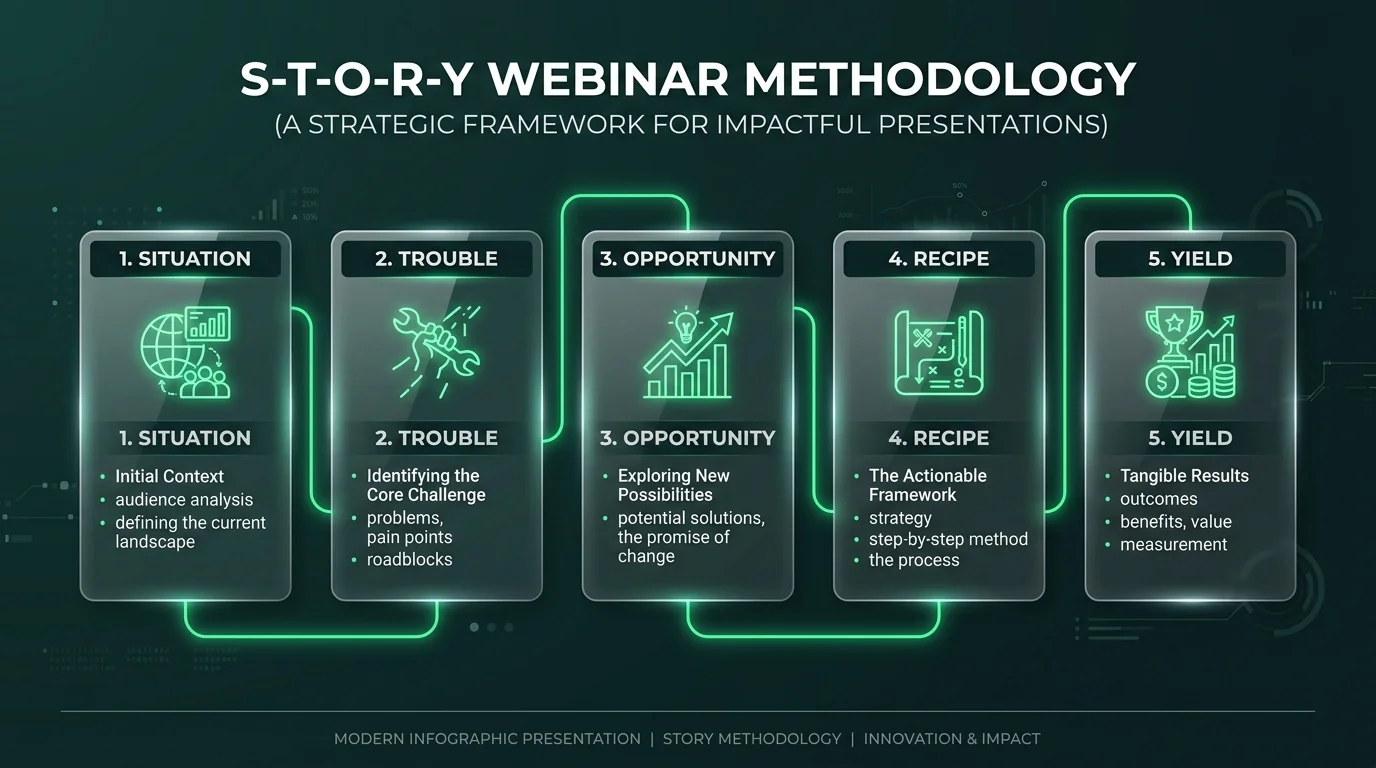
S 1. Situation (Context & Baseline Empathy)
Within the first 90 seconds, articulate the exact current reality of your attendees. Avoid self-indulgent 10-slide biography resumes. Instead, prove that you understand their day-to-day environment, constraints, and aspirations. State the precise goal of the session and establish the ground rules for participation.
T 2. Trouble (The Hidden Obstacle & Cost of Inaction)
Diagnose the root problem that keeps your audience stuck. Why do standard industry approaches fail? Highlight the hidden friction points, regulatory traps, or wasted capital that occur when relying on outdated tactics. This section creates productive cognitive tension: attendees realize their current methods are unsustainable.
O 3. Opportunity (The Strategic Paradigm Shift)
Introduce the novel mental model or operational shift that solves the Trouble. Do not pitch software or services yet; deliver the intellectual breakthrough. When attendees understand why the new paradigm works, their skepticism dissolves and their receptivity to implementation spikes.
R 4. Recipe (The Actionable, Step-by-Step Blueprint)
Walk through the concrete implementation workflow. Show real dashboards, line-by-line configuration files, or live case studies. Proof beats adjectives every single time. Provide templates and exact checklists that attendees can execute immediately after closing the webinar.
Y 5. Yield (Measurable Outcomes & Next Steps)
Quantify the expected ROI, time savings, or error reduction when executing the Recipe. Transition seamlessly into the logical next step—whether downloading an advanced template pack, joining a live cohort, or booking an enterprise consultation.
The Psychology of Audience Retention: The 4-to-1 Rule
Traditional webinars suffer from a steep drop-off curve: after the initial novelty wears off around minute 10, audience attention plummets from 90% down to less than 30%. Attendees minimize the window, switch to checking emails, or leave the session entirely.
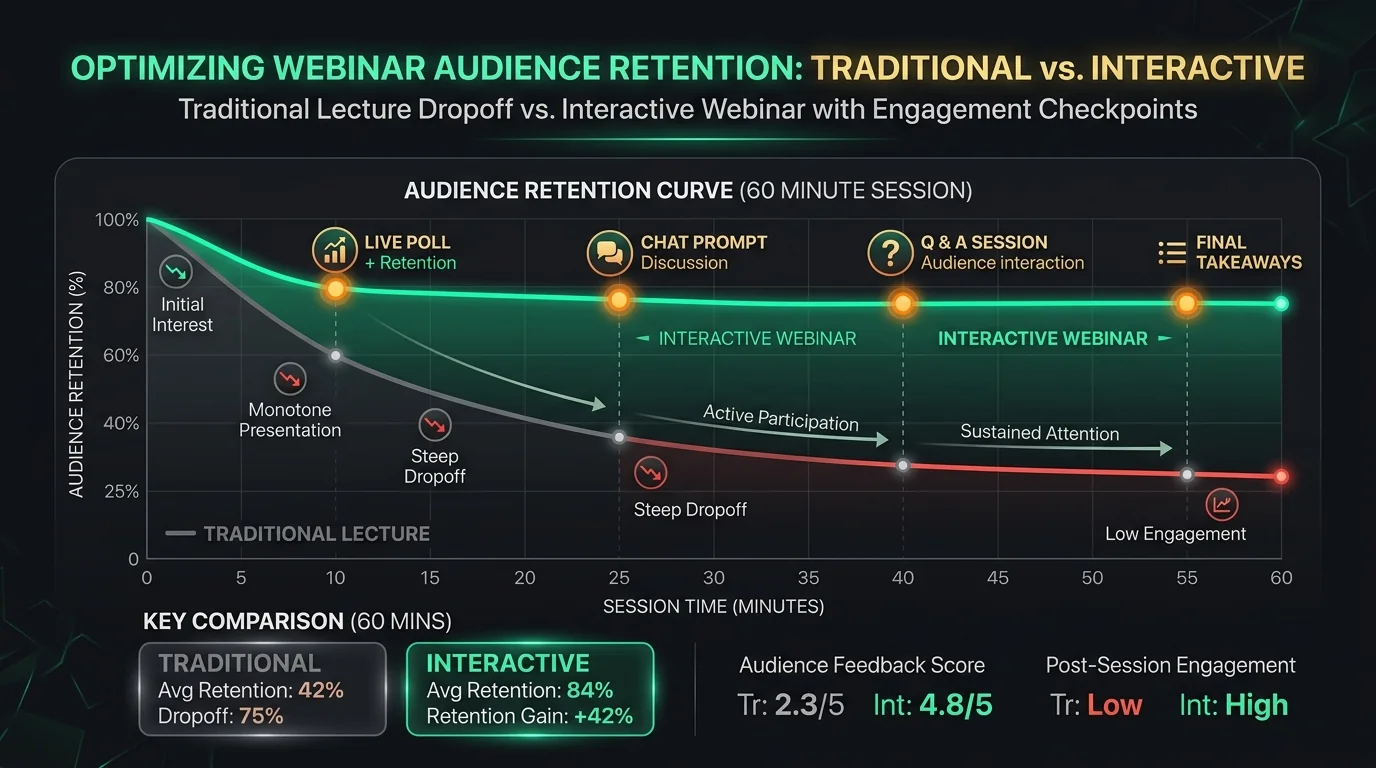
To maintain an 80%+ retention baseline across a 60-minute broadcast, implement the 4-to-1 Interaction Rule: for every 4 minutes of didactic instruction, introduce 1 low-friction audience micro-commitment:
- Minute 4 — Baseline Calibration Poll: A 2-option poll measuring the audience's primary pain point (e.g., "Is your team currently struggling more with lead quality or tech latency?").
- Minute 9 — Chat Keyword Bomb: Ask a binary question and prompt the chat: "Type '1' if you've experienced this outage, or '2' if you've never audited your DNS." Seeing hundreds of numbers fly through the chat creates social proof and wakes up passive viewers.
- Minute 15 — Live Annotation / Whiteboard Breakdown: Switch from slide decks to a live screen sketchpad or architectural diagram, breaking visual monotony.
- Minute 25 — Mid-Flight Temperature Check: Direct question to a specific attendee who commented earlier, validating individual participation.
- Minute 35 — Downloadable Asset Drop: Pin a bonus worksheet or cheat sheet in the chat window, rewarding continued live attendance.
Webinar Hardware & Studio Acoustics: Zero-Tolerance Essentials
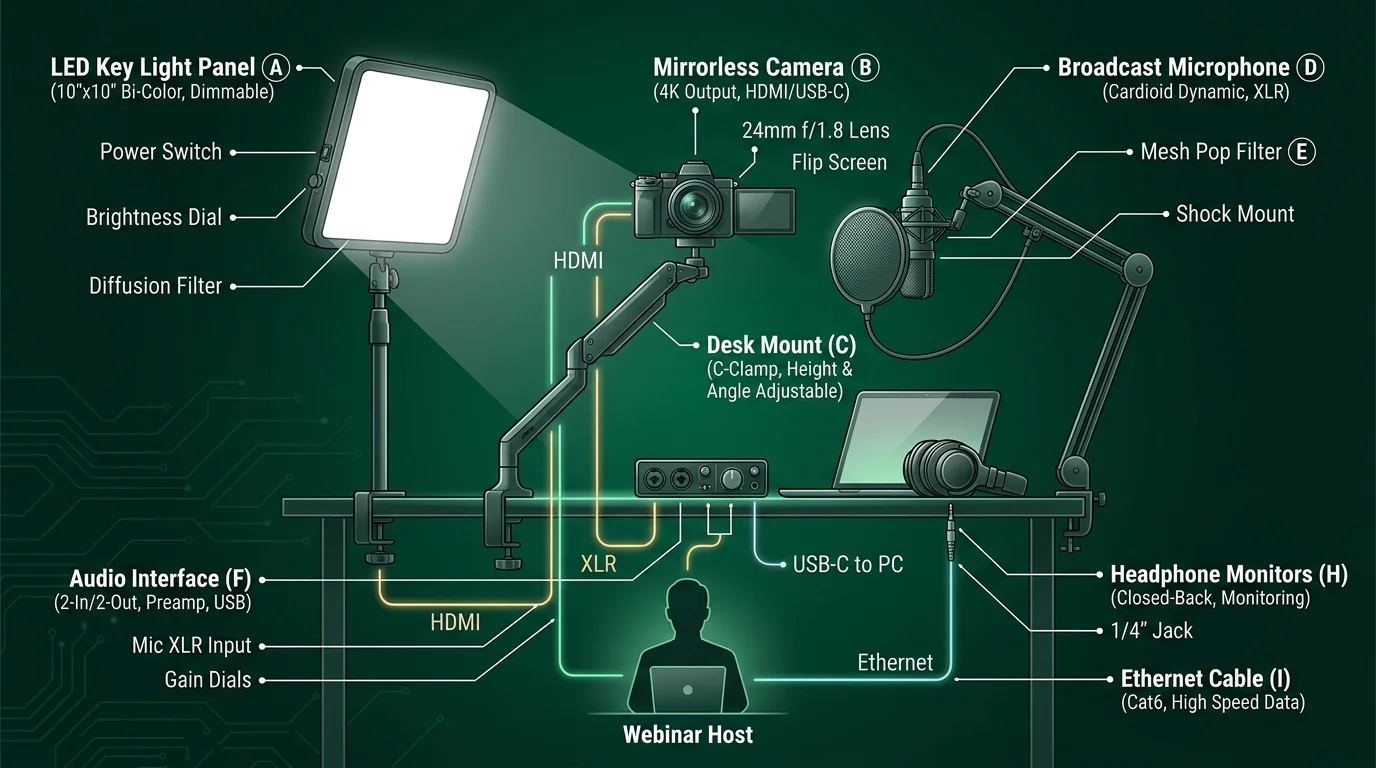
Audience studies consistently demonstrate that viewers will forgive minor 720p video compression, but will instantly disconnect if audio is muffled, echoing, or harsh. Your broadcast studio requires strict acoustic and hardware isolation.
| Component | Budget ( - ) | Prosumer ( - ,200) | Broadcast Studio (,500+) |
|---|---|---|---|
| Microphone | Audio-Technica ATR2100x-USB | Shure MV7+ / Rode PodMic USB | Shure SM7B + Cloudlifter CL-1 |
| Audio Interface | Direct USB Connection | Focusrite Scarlett 2i2 (4th Gen) | Rodecaster Pro II / Apollo Twin X |
| Camera | AnkerWork C200 / Logi Brio 4K | Sony ZV-E10 + Sigma 16mm f/1.4 | Sony FX30 / Canon EOS R6 Mark II |
| Key Lighting | Dimmable Ring Light (18") | Elgato Key Light Air (Dual) | Aputure Amaran 100d + Light Dome SE |
| Network Connection | Cat6 Ethernet (50 Mbps+) | Cat6 + Dual-WAN LTE Failover | Dedicated Gigabit Fiber + Hot Backup |
Critical Audio Calibration Checklist
Configure your audio input chain inside your digital mixer or OBS Studio using these calibrated parameters:
- Microphone Pickup Pattern: Always select Cardioid. Reject ambient reflections from rear and side walls.
- Proximity Rule: Position the microphone capsule 2 to 4 inches from your mouth at a 45-degree off-axis angle to eliminate plosives without obstructing your camera view.
- Gain Staging: Calibrate input levels so conversational speech hovers consistently between -18 dB and -12 dB, with natural laughter and emphasis peaking below -6 dB to prevent digital clipping.
- Noise Gate & High-Pass Filter: Enable an 80 Hz high-pass filter (HPF) to eliminate desk thumps, HVAC hum, and floor vibrations. Set a gentle noise gate threshold at -54 dB.
Webinar Software Evaluation: WebRTC vs. RTMP Streaming
Selecting the appropriate broadcasting platform dictates latency, attendee barrier to entry, and conversion tracking capabilities.
| Platform | Architecture | End-to-End Latency | Attendee Friction | Best For |
|---|---|---|---|---|
| Zoom Webinars | Desktop / Mobile App | < 500 ms (Real-time) | Medium (Requires App) | Enterprise meetings & multi-panelist panels |
| Demio | 100% Browser WebRTC | < 1 sec (Ultra-low) | Zero (1-Click Browser Join) | B2B SaaS demos & high-converting marketing funnels |
| StreamYard | Cloud WebRTC to RTMP | 3 - 10 sec (Standard) | Zero (Direct YouTube / LinkedIn) | Multi-streaming to social channels simultaneously |
| Livestorm | Browser WebRTC | < 1 sec (Ultra-low) | Zero (Instant Web Join) | Automated and on-demand recurring webinars |
The 4-Week Webinar Launch Timeline & Technical Checklist
High-performing marketing teams do not construct presentations the evening prior to broadcasting. Follow this rigorous 4-week countdown schedule to guarantee high turnout, seamless technical execution, and maximized post-event revenue.
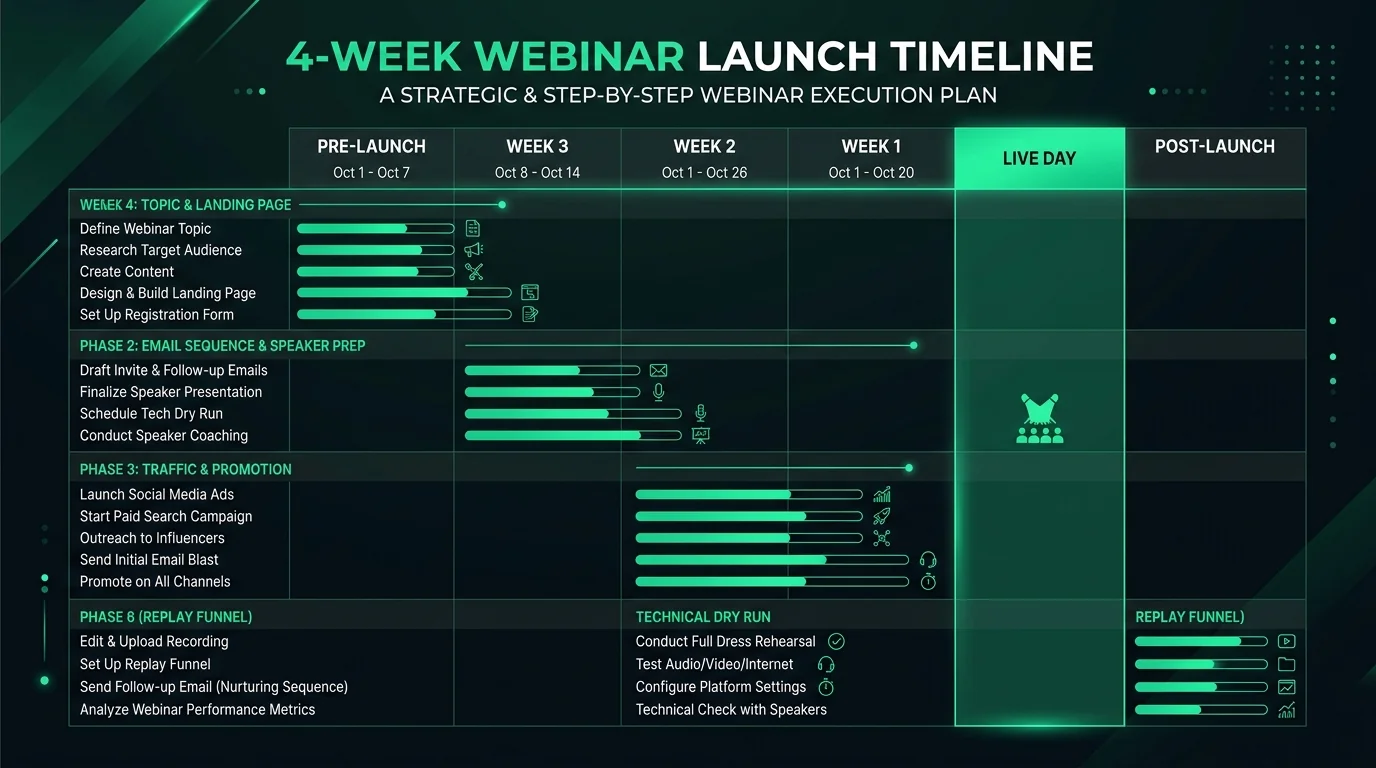
T-4 Weeks: Topic Definition & Landing Page Staging
- • Define a single, high-stakes hook (e.g., "How to Reduce AWS Infrastructure Costs by 42% Without Compromising Uptime").
- • Construct a distraction-free registration landing page: remove header/footer navigation, feature 3 bulleted takeaway outcomes, and embed a 1-click Google Calendar / Outlook invite button.
- • To collect attendee information before the event, use an online form builder like Jotform to create a customized webinar registration form and embed it directly on the landing page.
- • Set up UTM tracking parameters across all acquisition channels (email, LinkedIn, Twitter, paid search).
T-2 Weeks: Audience Promotion & Nurture Sequences
- • Launch the 3-phase promotional email sequence across your customer base and partner newsletters.
- • Deploy automated SMS confirmation reminders for registrants who opt in.
- • Finalize the S-T-O-R-Y presentation slides: enforce a strict maximum of 20 words per slide. Use diagrams, screenshots, and bold statistics rather than dense bullet points.
T-3 Days: The Full Dress Rehearsal
- • Conduct an end-to-end technical dry run with your designated moderator/producer.
- • Test screen-sharing resolution: scale your display resolution to 1080p (1920x1080) so text remains crisp and readable on mobile screens.
- • Verify backup connectivity: configure your smartphone as a hot-swappable USB tether hotspot in case home/office fiber disconnects.
- • Seed 5 high-value FAQ questions in advance for the moderator to deploy if live chat is slow during opening minutes.
T-0 (Live Broadcast Day): Execution Protocol
- • T-30 Mins: Reboot presentation machine. Terminate all background applications (Slack, Dropbox sync, email clients, Steam).
- • T-15 Mins: Open the broadcast room early. Play lo-fi background audio with a slide displaying: "Session starts at 1:00 PM EST — Audio Check: Can you hear music? Type your city in chat!"
- • T-0:00: Start promptly on the minute. Welcome early attendees by name and dive straight into the Situation phase.
- • T+45 Mins: Transition smoothly into the Q&A session. Address pre-seeded questions first, then pivot to live audience submissions.
T+2 to 48 Hours: The Replay & Monetization Funnel
- • Within 3 hours: Transcode and edit the replay video. Cut the awkward 5-minute pre-roll silence.
- • Deploy the 3-stage post-event email nurture sequence (Full Replay link, Key Takeaway PDF summary, and Final Call-to-Action deadline).
- • Repurpose the broadcast into 5 LinkedIn carousels, 1 YouTube pillar video with timestamps, and short video clips for social media.
Frequently Asked Questions
What is the ideal duration for a live webinar?
The benchmark duration for B2B and educational webinars is 45 to 60 minutes. This should break down as: 5 minutes for welcoming and contextualization (Situation), 30 to 35 minutes of core instructional delivery (Trouble, Opportunity, Recipe), and 15 to 20 minutes of dedicated interactive Q&A. Going beyond 60 minutes leads to steep audience fatigue unless running an intensive paid workshop.
What is a good webinar registration-to-attendee show-up rate?
Across the software and professional services industries, average live show-up rates range between 35% and 45% for free webinars. You can lift this rate above 50% by: sending automated calendar invites (.ics files), triggering SMS reminders 15 minutes before showtime, and emphasizing exclusive live bonuses (such as unreleased templates or live teardowns) that will not be available in the replay.
Why should I use a dynamic microphone instead of a condenser microphone?
Condenser microphones (like the Blue Yeti) feature ultra-sensitive diaphragms designed for acoustically treated sound booths. In a typical home office or corporate meeting room, condensers pick up keyboard clicks, room echo, air conditioning, and computer fans. Dynamic cardioid microphones (such as the Shure SM7B, Shure MV7, or Audio-Technica ATR2100x) require acoustic energy directly in front of the capsule, naturally isolating your voice from room noise.
Do I really need a co-host or moderator for a webinar?
Yes, for any audience exceeding 50 attendees, having a dedicated moderator is essential. The presenter should focus 100% of their cognitive bandwidth on vocal delivery, eye contact, and pacing. The moderator manages incoming chat queries, launches live polls, handles technical troubleshooting for attendees, filters questions for the Q&A segment, and drops relevant links at pre-scheduled moments.
How soon should I send out the webinar replay?
Deliver the replay within 2 to 4 hours after concluding the live session. Over 65% of replay views occur within the first 24 hours of broadcast conclusion. Waiting 48 hours or longer causes attendee intent to cool drastically. Pair the replay email with a concise 1-page summary PDF or key timestamp markers to cater to busy executives.

Written by Ayesha Hussain
Editor and Research Lead · Cubbbix
Ayesha Hussain leads technical research on content distribution, live broadcast engineering, and digital growth infrastructure at Cubbbix. Having architected and produced over 250 high-retention live digital workshops, her analyses provide battle-tested playbooks for technical founders and enterprise marketing teams.


Was this article helpful?
Comments
Loading comments...